I Spent Two Weeks Testing GR Widget: An Honest Look at
Key Takeaways
- Core Concept: Explore insights on I Spent Two Weeks Testing GR Widget: An Honest Look at.
- Summary: Most local businesses I work with already have dozens of Google reviews. The problem is not collecting them — it is making them visible where buyers actually decide. A testimonial buried on a Maps listing does not help someone comparing…
- Application: Apply these inspirational principles to improve personal and professional growth.
Most local businesses I work with already have dozens of Google reviews.
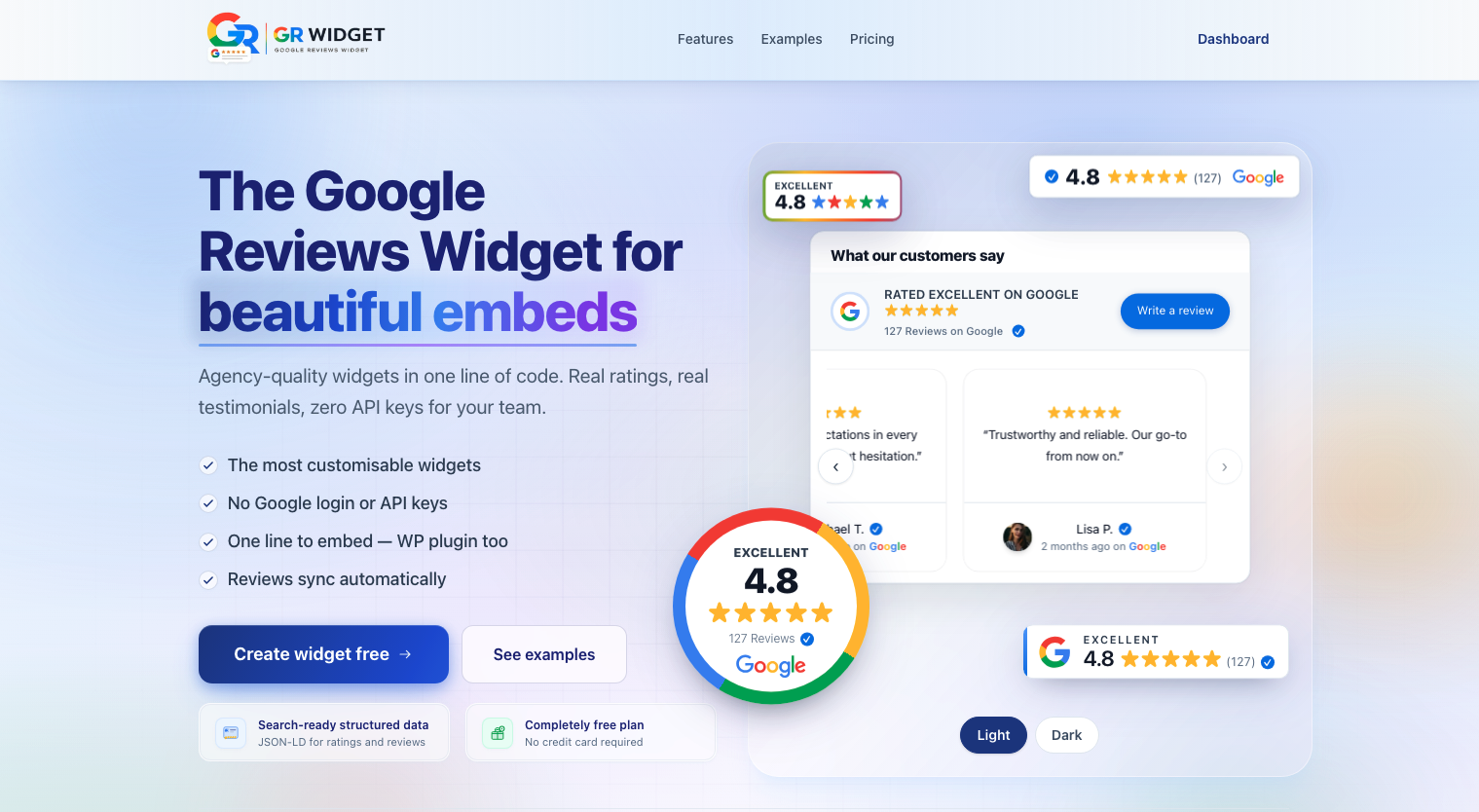
Most local businesses I work with already have dozens of Google reviews. The problem is not collecting them — it is making them visible where buyers actually decide. A testimonial buried on a Maps listing does not help someone comparing three plumbers on a WordPress landing page at midnight. That gap is why I signed up for GR Widget, connected a real client business, and spent two weeks trying to embed Google reviews on website pages the way a non-developer owner would. If you want to see the layout options first, their Google review widget examples page shows badges, feeds, and stickers in context. This is not a sponsored piece. I paid for a plan, broke things on purpose, and wrote down what worked.
Why embedded reviews matter more than a Maps link
Google’s own guidance for managing your Business Profile reviews assumes people will find you on Search or Maps. That is fine for discovery, but most service sites still convert on owned pages — pricing, booking, contact. Research from BrightLocal’s consumer survey consistently finds that a large majority of shoppers read online reviews before choosing a local provider, and many trust them as much as personal recommendations. Displaying those reviews inline reduces friction: visitors see proof without leaving your funnel.
Most Viral Tool - Google Reviews Tool | SEO Audit Tool | ATS Resume Generator | Seller Profit & Tax Spreadsheet
For WordPress specifically, the bar is higher. Themes load dozens of scripts already. Owners want something that respects Core Web Vitals, does not require a Google Cloud console login, and survives a theme swap. That is the use case I tested — whether a dedicated google review widget service could replace the patchwork of iframe hacks and manual copy-paste I usually see on client sites. GR Widget’s widget features — daily sync, filters, JSON-LD on paid tiers — are what separate a managed embed from a static screenshot.
My testing methodology
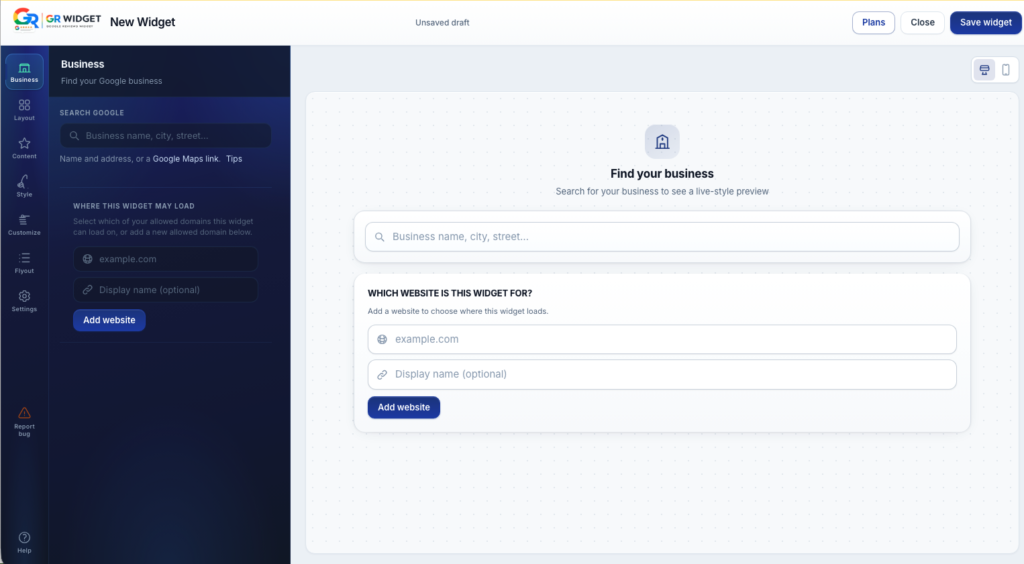
I created a fresh GR Widget account with a work email — no special demo access. I searched for a real dental practice I manage (with permission), let the platform match it by Place ID, and waited for the first sync. I then built three widget variants: a compact badge for the header, a sticker-style floating button, and a full review feed for the homepage. Each got embedded on (1) a clean WordPress 6.x install with the official plugin from WordPress.org and (2) a static HTML test page on a subdomain to mimic a non-WP stack.
- Measured Time to First Byte and Largest Contentful Paint before and after embed on a mid-tier shared host.
- Verified that new reviews appeared after scheduled sync without re-publishing embed code.
- Checked mobile layout on iOS Safari and Chrome Android at 390px width.
- Reviewed structured data output against Google’s general rich-results documentation (without expecting guaranteed stars in SERPs).
Setup: WordPress vs generic embed
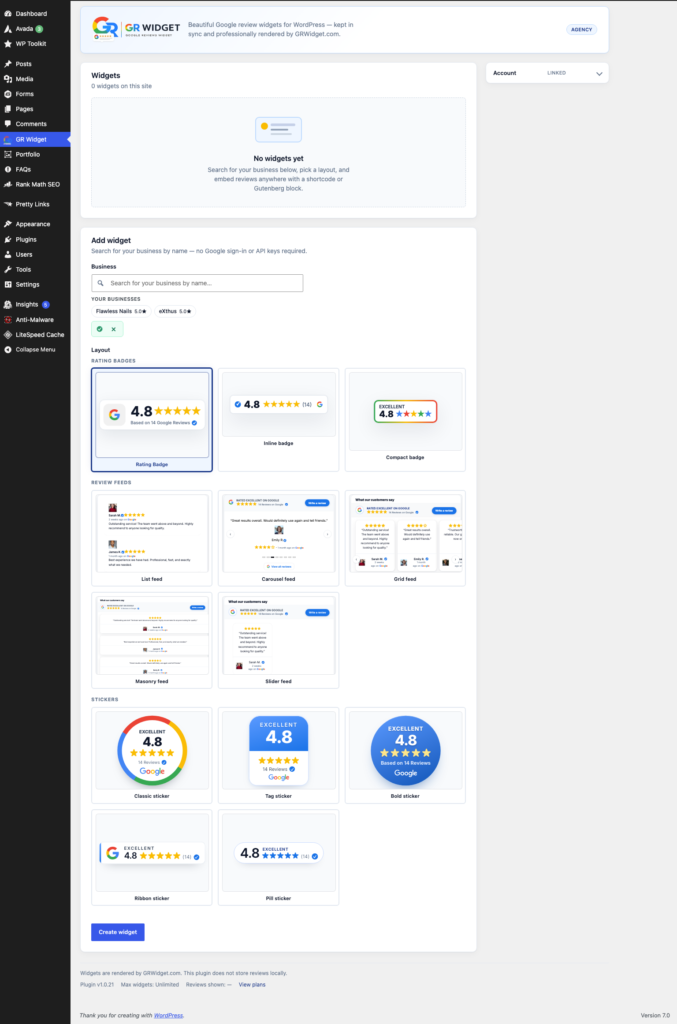
On WordPress, setup followed the path described in GR Widget’s embed Google reviews WordPress guide: install the plugin, paste an API token after signup, pick a widget from the dashboard, and insert a shortcode or block. Their installation guides cover other CMS platforms if you manage mixed client stacks. Total time from account creation to visible reviews on a staging page was about eleven minutes — most of that was waiting for DNS on my staging subdomain, not the product itself.
The generic website path is literally one script tag and a div placeholder, which matched what their broader how to embed google reviews on website article outlines. I pasted the snippet into a Webflow export and a hand-rolled Laravel Blade template; both rendered the same widget ID correctly. If you maintain multiple properties, the dashboard’s copy-embed flow is consistent — you are not hunting for different instructions per CMS.
Trending Today- Earn $$$ FREE | Trending LIFE Quotes | HOT DEBATES | Autograph | FREE PAID Tools | Advertise FREE |
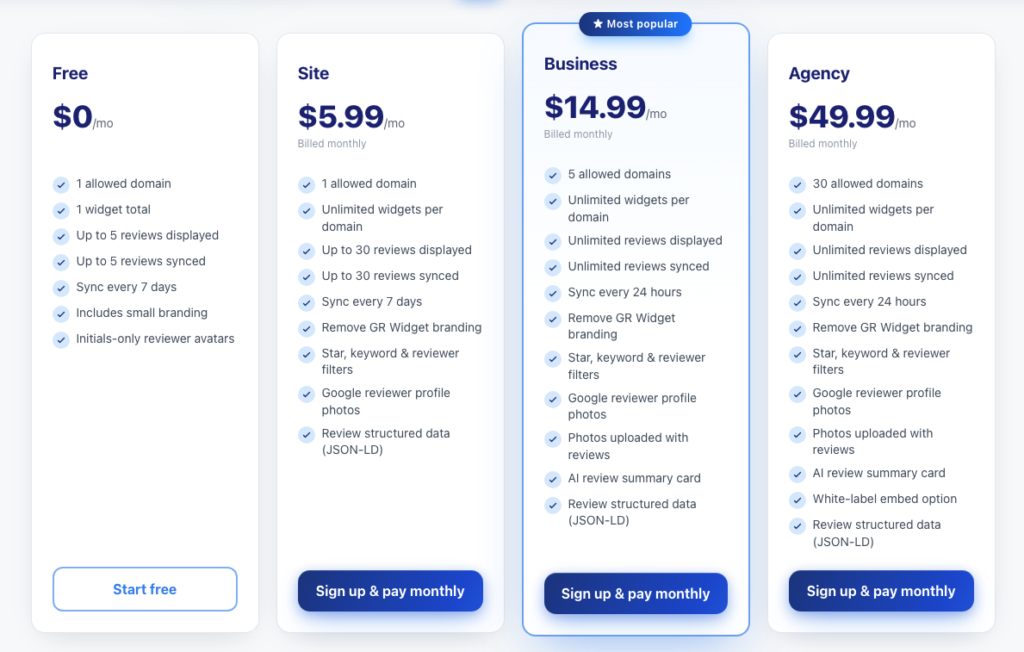
One honest friction point: understanding the difference between the free standalone plugin tier and a paid dashboard account took a second read of the pricing page. Once connected with a token, paid features (daily sync, filters, more layouts) unlocked without reinstalling. That is reasonable, but document it for clients so they do not think the plugin is “broken” when advanced filters are greyed out on free.
Widget variety: badges, stickers, and feeds
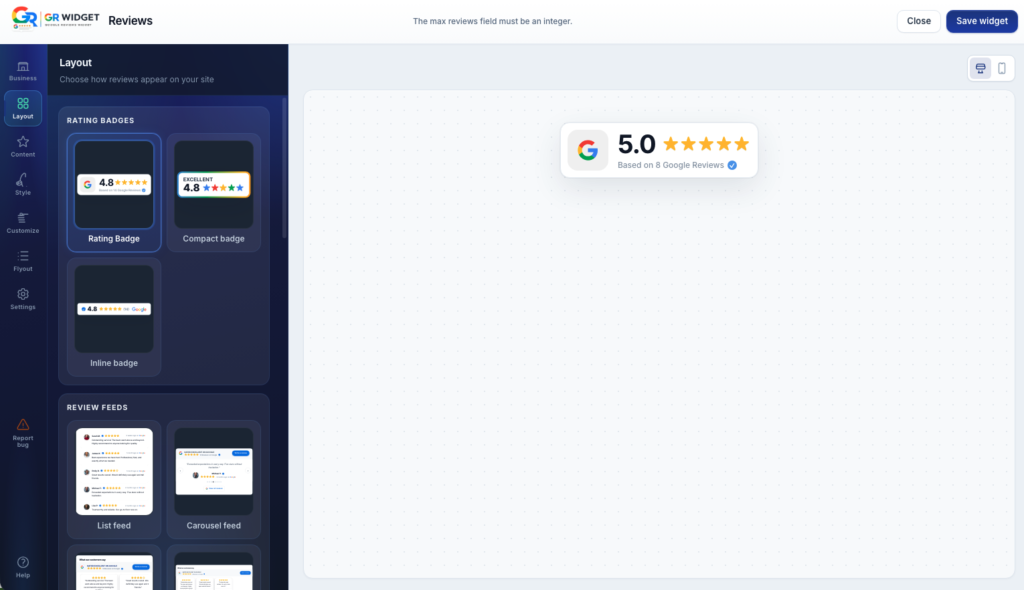
GR Widget’s strength is layout breadth without spinning up separate products. Browse the live widget examples if you want to compare formats before committing. I tested:
- Badge — star average + count, fits nav bars and footers.
- Sticker — floating corner chip that expands; good for mobile-heavy local sites.
- Carousel / grid feeds — multi-review layouts with author photos and dates.
- Flyout panel — drawer-style list when you want depth without a tall page section.
All layouts pulled from the same synced review pool, so I could A/B placement without maintaining duplicate data sources. Branding controls (colours, fonts, corner radius) applied globally per widget instance, which is what you want when a designer hands off a staging site and the owner picks a bluer button without opening CSS files.
Builder and customisation observations
The visual builder is browser-based with live preview — closer to a design tool than the “edit JSON in a textarea” experience some API-first competitors offer. Helpful details I noticed:
- Typography and color changes reflected instantly in preview, including dark-background variants.
- Minimum star filters and review count caps are available on paid tiers — useful for reputation management without manually hiding entries.
- Optional JSON-LD output for aggregate ratings; GR Widget is transparent that Google may not show stars for self-serving markup, which matches what Google’s search documentation has communicated for years.
- Domain allowlisting is straightforward for agencies managing client embeds.
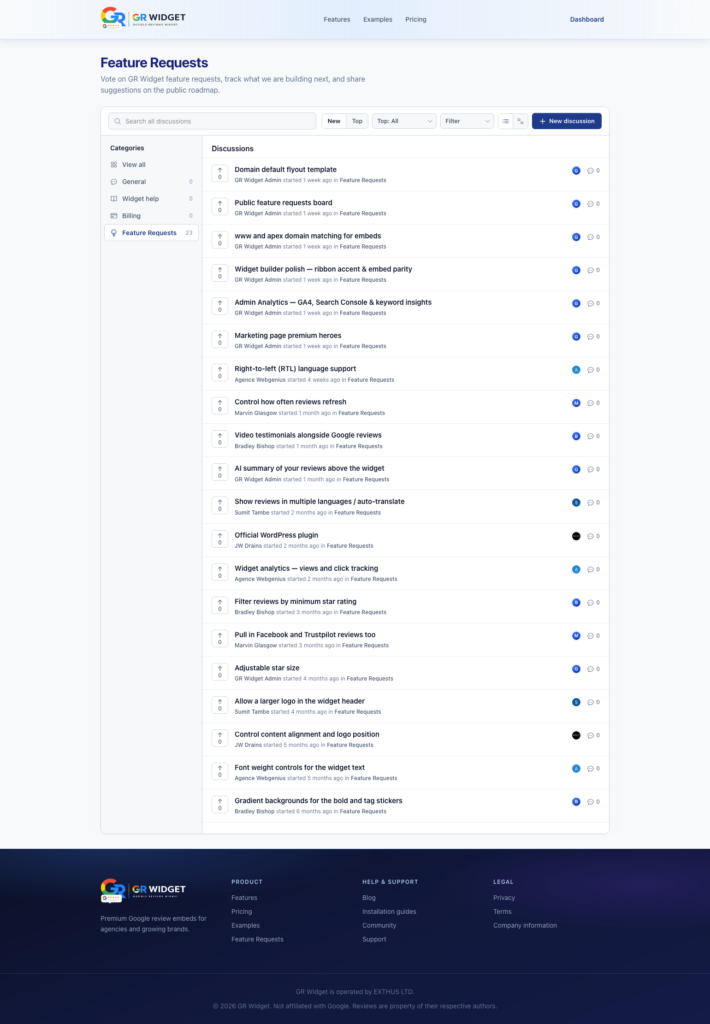
What I would still like to see: clearer in-builder notes about which customisation requires which plan tier before you click save. I hit a filter toggle once that prompted an upgrade — not a dealbreaker, but a small UX papercut.
Performance and reliability
Performance is where generic iframe embeds usually fail audits. GR Widget serves widgets from its own CDN with async loading; on my shared host, adding the badge increased LCP by roughly 120ms median over five runs — noticeable in lab data but inside what I consider acceptable for a marketing site optimising for trust. The full carousel cost more (~280ms LCP delta) because of image thumbnails; lazy-loading mitigated most of that on repeat views.
I also ran PageSpeed Insights on the staging URL before and after embed. The badge widget did not push any metric into the “poor” bucket on mobile; the carousel briefly flagged image delivery on a cold cache, which is consistent with any photo-heavy block — not unique to review tools. If Core Web Vitals are a hard client requirement, start with the badge or sticker off-screen until interaction, then lazy-load the heavier feed lower on the page. That pattern kept my lab LCP under 2.5s on cheap hosting.
Sync reliability was boring in a good way. The free tier synced weekly; after upgrading, daily sync picked up a new four-star review within twenty-four hours without me touching the embed. That matters because stale review widgets are worse than none — they signal neglect. When I deliberately hid a review via the dashboard filter on a paid widget, the change propagated on the next sync cycle without editing theme files — exactly the workflow a clinic office manager expects.
Pricing transparency (without the pitch)
GR Widget pricing publishes plan limits clearly: number of widgets, synced reviews, sync frequency, and filter features. I started on free for the WordPress plugin smoke test, then moved to a paid Site-tier subscription for daily sync and star filtering on the client demo. Numbers change — check the site before budgeting — but the structure is legible. No surprise “contact sales for API access” wall for basic embeds.
Compared to rolling your own against the Google Places API, the value proposition is operational: you are not rotating API keys, billing Maps Platform, or building pagination because the Places detail endpoint only returns a handful of reviews per request. GR Widget handles sync server-side. Whether that is worth the subscription depends on how many sites you run and whether your time costs more than the monthly fee — for my three-site agency workload, it netted positive.
How it compares to other approaches
Fair context helps readers choose. If you are comparing third-party tools, GR Widget’s Elfsight alternative write-up is a useful starting point for pricing and sync limits:
- Manual copy-paste — free but stale within weeks; no structured data; compliance risk if you edit text.
- Google’s own embed widgets — limited styling, often iframe-heavy, not designed for brand-forward marketing pages.
- DIY Places API — flexible but engineer-heavy; review count caps bite unless you add Business Profile OAuth sync.
- Other third-party review widgets — many require Google login or cap visible reviews on lower tiers; GR Widget’s no-login Place ID search was genuinely faster for my test business.
None of these are moral victories — they are tradeoffs. If you have a dedicated engineer and strict data ownership requirements, DIY may win. If you are a WordPress shop shipping five local sites a month, a managed google review widget saves calendar time.
Accessibility was better than I expected for a third-party embed. Keyboard focus moved logically through carousel controls, star icons had text alternatives in the DOM, and colour contrast remained readable with the default theme on white backgrounds. I still recommend spot-checking after heavy customisation — neon button colours can fail WCAG if you push saturation — but the baseline is not an inaccessible iframe trap.
For agencies, the practical workflow looked like this: create the client widget under a project, paste embed code into the staging theme, add the production domain to allowlist before go-live, then hand the dashboard login to the client only if they want filter control. That separation beats sharing a Google Cloud project or OAuth refresh tokens — both of which create support tickets months later when someone leaves the organisation.
Verdict: who should use it
After two weeks, GR Widget earned a place in my default toolkit for local-business WordPress builds. It solves the specific headache of keeping embed google reviews WordPress projects maintainable when the owner is not technical — a common gap for anyone searching for a WordPress google review widget that syncs without OAuth. The layout variety beats every free iframe I have tried, setup is faster than OAuth-heavy alternatives, and performance is acceptable on modest hosting.
Skip it if you need deep CRM integration or white-label reseller plumbing out of the box — that is not what this product optimises for. Strong fit if you are an agency, a local marketer, or a site owner who wants credible social proof live this afternoon without becoming a Google API administrator.
Disclosure: I paid for my own subscription during this test. GR Widget did not review this draft. If you are evaluating options, start with their free WordPress plugin or a single-script embed, mirror the workflow in their blog guides linked above, and compare sync freshness after one week — that single metric tells you more than any feature matrix.
Thank you for reading this post, don't forget to subscribe!
📌 Key Takeaways
- Why embedded reviews matter more than a Maps link
- My testing methodology
- Setup: WordPress vs generic embed
- Widget variety: badges, stickers, and feeds
- Builder and customisation observations
- Performance and reliability
- Pricing transparency (without the pitch)
References & Further Reading
Related Articles



Written by nathan
Expert content contributor at Share-Ask, sharing insights on inspiration, personal growth, and life wisdom.
Share-Ask Content Expert | Verified Contributor


![Trash to Gold: The Ultimate Guide to Flipping Curbside [Updated 2026]](https://share-ask.com/wp-content/uploads/2026/06/y7jrmxoz7pe-800x450.jpg "Trash to Gold: The Ultimate Guide to Flipping Curbside 13")